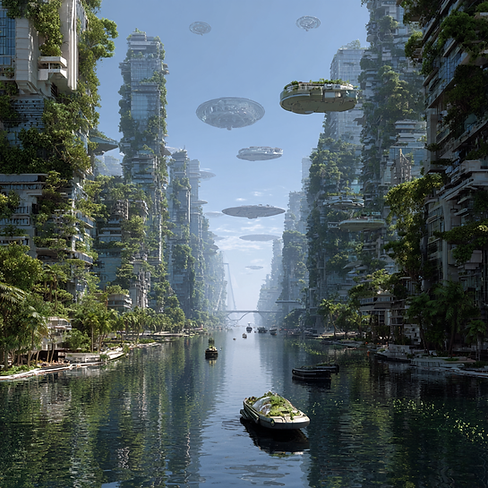
Midjourney Example
Project Overview: “My Imagined World”
Grade Levels: 3–5 or 6–8
Theme: Students imagine and illustrate their own worlds or futuristic scenarios using AI-generated imagery (via Midjourney), then present and reflect on their creation through writing, math, science, and social studies lens.
1. Kickoff & Inspiration
-
Hook: Show a selection of inspiring AI-generated landscapes/characters from Midjourney to spark students’ imaginations.
-
Goal: Invite students to design a “world” of their choice—maybe an alien planet, a futuristic city, an underwater civilization, or a novel ecosystem.
2. Creation & Design (Art & Science Integration)
Science (NGSS aligned):
Students think like scientists and engineers by describing features of their world—climate, ecosystems, adaptations, energy sources. These align with California’s Next Generation Science Standards, encouraging students to “think like scientists and engineers” SCOE.
They should explain, for instance:
-
How do plants/animals survive there?
-
What kind of weather or geological features exist?
-
How might people in that world meet basic needs?
3. Storytelling & Writing (ELA Integration)
Students create a descriptive story or narrative set in their imagined world:
-
Grades 3–5 focus on descriptive writing and basic narrative structures.
-
Grades 6–8 incorporate richer language, dialogue, and structure.
ELA Alignment:
-
Writing standards: Use descriptive language, sensory details, and narrative elements (e.g. CCSS Writing for grades 3–8)
-
Speaking & Listening Standards: Present their world in small groups or class settings, fostering effective communication.
4. Math Connections
Mathematics Alignment:
-
Students model elements from their world—like population, resource distribution, or scale.
-
Example tasks:
-
Calculate ratios: "If our city has 4 water purification centers for 360 citizens, what's the ratio?"
-
Work with area/perimeter if drawing maps: "If the lake is a rectangle 12 units by 8 units, what’s the area?"
-
Use proportions or scale factors for maps or population projections.
These tasks align with CCSS Math standards for grades 3–8
5. History/Social Studies
ConnectionsStudents can think about:
-
How societies are structured in their worlds—governance, trade, cultural traditions.
-
Compare and contrast with Earth-based civilizations, aligning with California History–Social Science Standards SCOE.
6. Presentation & Reflection Showcase
-
Students present their AI-generated world followed by their scientific explanations, creative writing, math modeling, and historical/social structure analysis.
-
Use rubrics aligned with standards-based grading—clearly showing mastery levels (1–4) for each content area
🎯 Learning Goals
-
ELA: Write descriptive/narrative texts; present orally with visuals (CCSS.ELA-Literacy.W.4–6.3; SL.4–6.4).
-
Math: Apply ratios, scale, and geometry to maps/models (CCSS.MATH.Content.4.NF, 5.NF, 6.RP).
-
Science: Model ecosystems, explain climate & adaptations (NGSS 4-LS1-1, 5-ESS2-1, MS-LS2-1).
-
Social Studies: Compare civic structures and cultures with real-world societies (CA HSS Standards 4.4, 5.9, 6.7).
-
Digital Literacy: Evaluate and create with AI responsibly (ISTE Digital Fluency standards).
📅 2-Week / 8-Period Plan
Day 1 – Launch & Inspiration
-
Show MidJourney AI images (landscapes, futuristic cities, creatures).
-
Driving Question: “What would a new world look like if we could design it?”
-
Brainstorm individually → What kind of world would you design? (underwater, desert, alien planet, floating city, etc.)
-
Standards: ELA Speaking & Listening, NGSS Science Practices.
Day 2 – Science Foundations
-
Mini-lesson: ecosystems, climate, adaptations.
-
Students define their world’s environmental rules (gravity, weather, food sources, plants/animals).
-
Worksheet: “My World’s Ecosystem” (draw and label).
-
Standards: NGSS 4-LS1, 5-ESS2.
Day 3 – Math & Mapping
-
Introduce scale, area, ratio through map-making.
-
Students sketch a map of their world/city → apply scale (e.g., 1 inch = 10 miles).
-
Calculate distances, area, or resource allocation.
-
Standards: CCSS Math – Measurement & Data, Ratios, Geometry.
Day 4 – Narrative Writing
-
Writing workshop: students write a descriptive narrative set in their world.
-
Include characters, setting, problem, and cultural details.
-
Peer feedback using rubric (focus on sensory details).
-
Standards: CCSS ELA Writing Narrative 4–6.3.
Day 5 – Social Studies & Culture
-
Discuss community, government, and trade in real societies.
-
Students design their world’s society:
-
Who leads?
-
How do they share resources?
-
What cultural traditions exist?
-
-
Compare to ancient civilizations (link to CA Social Studies Standards).
Day 6 – Visual Creations
-
Students create AI-generated images with teacher support (using prompts).
-
Each student generates at least 2–3 images:
-
Landscape/environment
-
Creature/character
-
Cultural artifact or city design
-
-
Standards: ISTE Digital Citizenship, ELA Speaking/Visual Integration.
Day 7 – Finalizing & Practice
-
Students compile:
-
Narrative (ELA)
-
Map with scale (Math)
-
Ecosystem chart (Science)
-
Civic description (Social Studies)
-
AI visuals (Art/Tech)
-
-
Practice presentations in small groups.
Day 8 – Showcase
-
“World Expo”: students present their worlds to peers, parents, or another class.
-
Presentations include visuals, narrative reading, and explanation of math/science connections.
-
Peer feedback + reflection journal: “What did I learn about how people and environments are connected?”
📊 Deliverables
-
Written narrative (2–3 pages)
-
World map with scale & ratios
-
Ecosystem diagram (food web/energy flow)
-
Civic structure description (government, culture, traditions)
-
3 AI-generated images
-
Final presentation (World Expo)
✅ Standards Alignment (San Jose / CA)
-
ELA (Grades 4–6): CCSS.ELA-Literacy.W.4–6.3 (narrative writing), SL.4–6.4 (presentations).
-
Math: CCSS.MATH.Content.4.MD (measurement/scale), 5.NF (fractions/ratios), 6.RP (ratios/proportional reasoning).
-
Science (NGSS): 4-LS1-1 (structure & function in living things), 5-ESS2-1 (Earth systems), MS-LS2-1 (ecosystems).
-
Social Studies (CA): 4.4 (Native environments & adaptations), 5.9 (forming governments), 6.7 (ancient civilizations).
-
Digital Literacy: ISTE 1.1 Empowered Learner, 1.6 Creative Communicator.